USAID DEC
Readyboard User Information
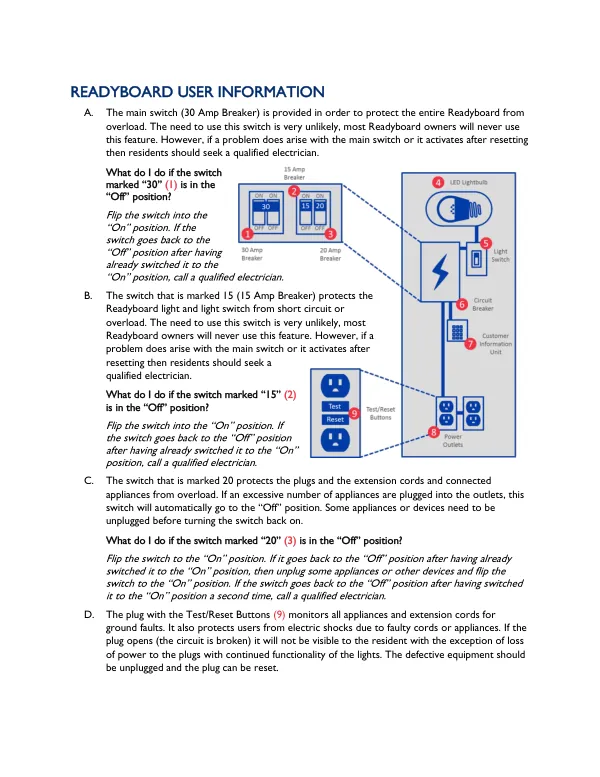
The main switch is provided to protect the entire Readyboard from overload.
2016 · 3 pages
Sign in to readA free account is required to download.
Abstract
This switch is marked "30" and is located in the "Off" position by default. To turn it on, simply flip the switch to the "On" position. However, if the switch goes back to the "Off" position after being turned on, it is recommended to seek the assistance of a qualified electrician. The switch marked "15" protects the Readyboard light and light switch from overload. This switch is also located in the "Off" position by default. To turn it on, flip the switch to the "On" position. If the switch goes back to the "Off" position after being turned on, it is recommended to seek the assistance of a qualified electrician. The switch marked "20" protects the plugs, extension cords, and connected appliances from overload. If an excessive number of appliances are plugged into the outlets, this switch will automatically go to the "Off" position. To resolve this issue, unplug some appliances or devices and then flip the switch to the "On" position. If the switch goes back to the "Off" position after being turned on, it is recommended to seek the assistance of a qualified electrician. The plug with the Test/Reset Buttons monitors appliances and extension cords for ground faults and protects users from electric shocks due to faulty cords or appliances. If there is no power at the plugs, but the light works, unplug appliances and devices and press the reset button on the first plug. The appliance with the fault should be repaired or replaced. System power outages may occur due to a defective transformer. If there is no power at the plugs and the light, check that all switches are in the "On" position. If the issue persists, check with your neighbors to see if they have light or if it is a JPS outage. Report local system outages to JPS. The light bulb will eventually burn out. If all switches are on and there is power at the plugs, but the light bulb is not working, it is likely that the light bulb has burned out. To replace the light bulb, remove the two screws holding the front cover on, unscrew the old bulb, install a new one, and reinstall the front cover. The recommended replacement bulb should be a 13-watt, LED Type, Shape A. The Ground Fault Circuit Interrupter (GFCI) should be tested periodically to ensure it is functioning correctly. To test the GFCI, press the test button on the plug. This will cause all appliances and devices to lose power. Press the reset button to restore power to the plugs. Outlet safety is crucial to prevent electric shocks. The GFCI is designed to protect people from severe or fatal electric shocks, but it cannot guarantee safety in the event of tampering. Only electrical appliances and extension cords should be inserted into the plugs. Outlet plugs should be used to prevent inadvertent tampering, especially in households with young children. Extension cord sizes vary depending on the intended use. Heavy-duty extension cords are recommended for tools and appliances such as fridges and irons. Light-duty extension cords are suitable for lamps and other low-power devices.
Related documents
Documents in this collection
 2024
2024USAID DEC
Municipal Power Procurement A Learning Guide for South African Municipalities
Open record 2018
2018USAID DEC