USAID DEC
Account Setup Steps for the Development Experience Clearinghouse
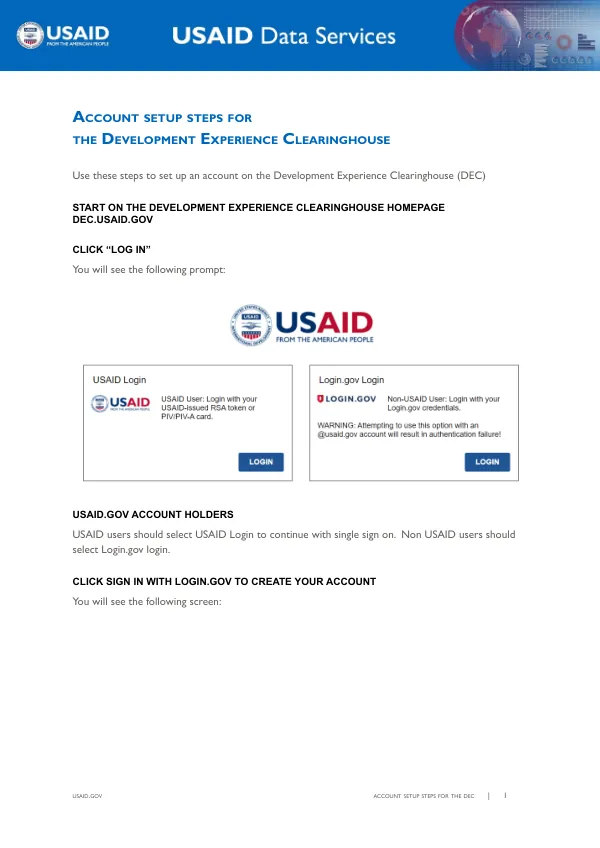
The Development Experience Clearinghouse (DEC) account setup process begins on the DEC homepage, DEC.USAID.GOV.
4 pages
Sign in to readA free account is required to download.
Abstract
The first step is to click "Log In," which prompts users to select either USAID Login for single sign-on or Login.gov login for non-USAID users. Non-USAID users should click "Sign in with Login.gov to create your account." Upon selecting Login.gov login, users are directed to the USAID.GOV ACCOUNT SETUP STEPS FOR THE DEC page. The first step in creating an account is to determine whether the user has already created a login.gov account. If the user has an existing account, they should click "Sign in." If not, they should click "Create an account." Federal users must use their ".gov" email account for correct account permissions, while non-federal users should use their work email accounts. Users who have previously submitted data to the DEC should use the email account associated with their prior registration to ensure access to their prior work. The next step is to verify the user's email address. An email verification message is sent to the specified email address, and the user must click the "Confirm email address" link to navigate back to the Login.gov portal and create a password. Following email verification, users are prompted to select a secondary authentication method. Several options are available, including telephone number authentication. To use telephone number authentication, users select "Phone" and follow the instructions to receive a security code and complete the authentication. Users can choose to receive the security code by text message or phone call. If users encounter issues during the account setup process, they can refer to the troubleshooting section. DEC account holders who receive a "This page isn't working" message after logging in should email the Data Services Team at [email protected] to ensure their account is active. Per USAID policy, accounts are automatically deactivated after 90 days of non-use. For issues related to creating and logging into the Login.gov portal, users should contact the Login.gov support team through the Login.gov Support Portal. The Data Services Team can be contacted for issues related to the partner account process and account activation at [email protected].