USAID DEC
HR Operator Quick Reference Guide
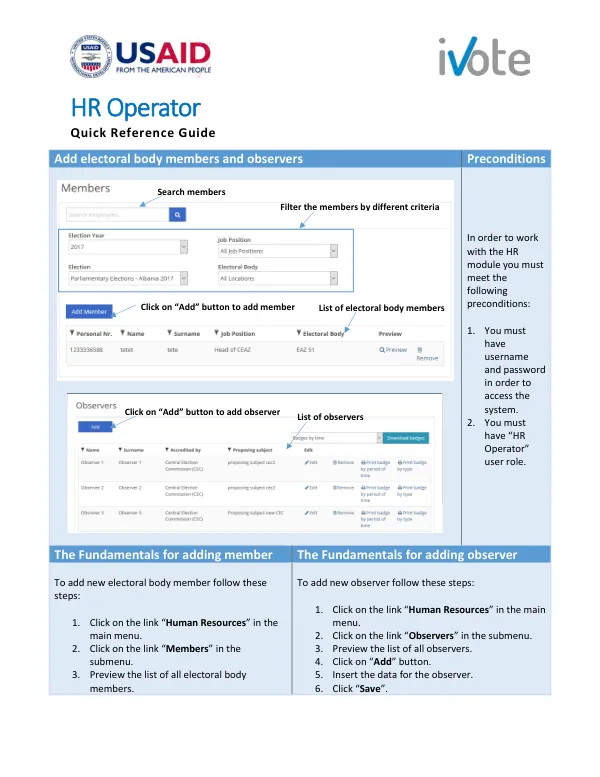
To work with the HR module, several preconditions must be met.
2 pages
Sign in to readA free account is required to download.
Abstract
These include having a username and password to access the system, as well as the "HR Operator" user role. The process of adding a new electoral body member involves several steps. First, the user must click on the link "Human Resources" in the main menu. Next, they must click on the link "Members" in the submenu. This will allow them to preview the list of all electoral body members. A similar process is followed to add a new observer. The user must click on the link "Human Resources" in the main menu, followed by the link "Observers" in the submenu. They will then be able to preview the list of all observers. To add a new observer, the user must click on the "Add" button, insert the required data, and then click "Save". Once the user has accessed the members or observers section, they can filter the list by different criteria. This allows them to quickly locate specific individuals. To add a new member, the user must click on the "Add Member" button. They will then be required to insert personal information, education and training details, employment information, and employment assessment data. After completing each section, the user must click "Save and continue" to progress through the form. The HR Operator role grants the user the ability to add, edit, and remove electoral body members and observers. Additionally, they can print badges for observers.