USAID DEC
MANUAL DE PRUEBAS EN AMBIENTE DE CALIDAD
The manual for testing in a quality environment is designed for users Rudy Tapia and Luis Campos.
8 pages
Sign in to readA free account is required to download.
Abstract
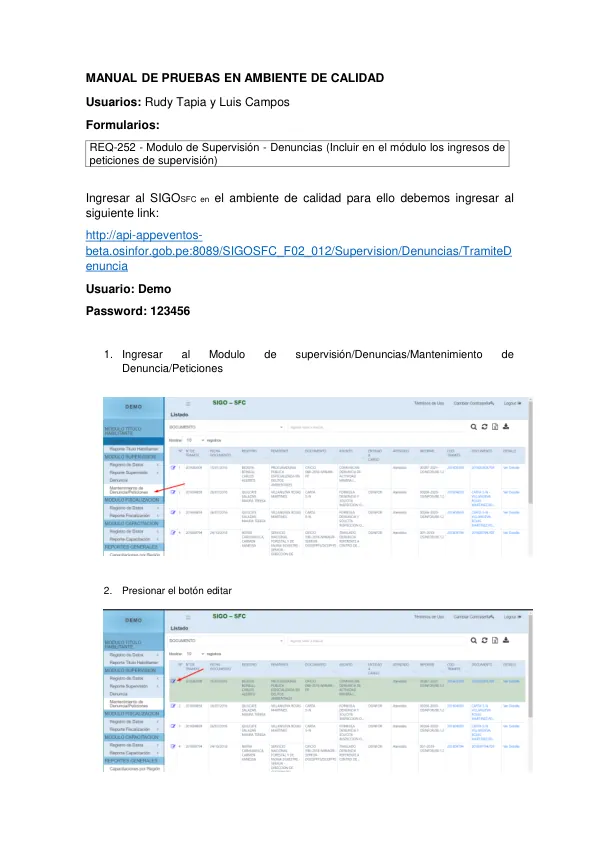
The manual outlines the procedures for accessing and utilizing the SIGOSFC system in a quality environment. To access the SIGOSFC system, users must log in to the following link: http://api-appeventos-beta.osinfor.gob.pe:8089/SIGOSFC_F02_012/Supervision/Denuncias/TramiteDenuncia. The login credentials are User: Demo and Password: 123456. Once logged in, users must navigate to the Modulo de Supervisión/Denuncias/Mantenimiento de Denuncia/Peticiones section. From there, users must press the edit button to access the system. The system requires users to select whether a request was attended to or is currently in process, the type of requirement, and whether the title is habilitante or not. Users must then press the "+" button to add the title habilitante information and select the relevant title habilitante from the list. Upon selecting the title habilitante, users must press the add button to proceed. The system will then display a new window with the selected title habilitante information. Users must then press the "+" button to add the informe de supervisión and select the relevant informe de supervisión from the list. Once the informe de supervisión has been added, users must press the add button to proceed. The system will then display a new window with the selected informe de supervisión information. Users must then press the "+" button to add the SITD documents, select the relevant document from the list, and press the add button to proceed. The system will then display a new window with the selected SITD information. Users must then press the "+" button to add additional files, select the file from their computer, and press the "+" button in the pop-up window to add the file. Once the file has been added, users must press the close button to validate that the file was uploaded correctly. Users must then press the save button to save the changes. After saving the changes, users must search for the registered document in the search bar and press the "Ver detalle" button to view the document details. Users must then press the "Documento" button to validate that the downloaded file matches the previously uploaded file. Finally, users must press the "COD. TRAMITE" button to validate that the system displays the correct information registered in the SITD.
![Guía para Evaluación Rápida de Daños y Manual Para diligenciamiento del Formulario de ERD [V2.1]](https://covers.devme.ai/gen/143436.webp)