USAID DEC
Manual técnico de Instalación del Sistema Madre Canguro
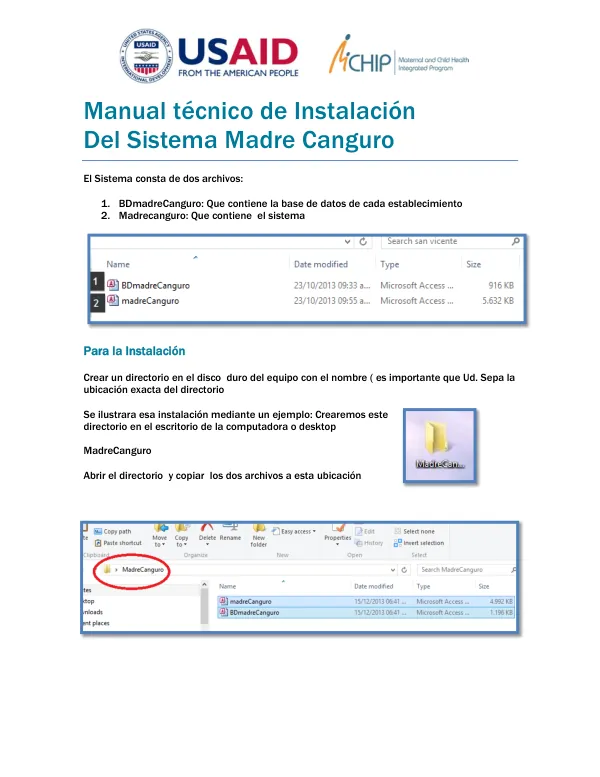
The Sistema Madre Canguro is a system consisting of two files: BDmadreCanguro and Madrecanguro.
5 pages
Sign in to readA free account is required to download.
Abstract
The BDmadreCanguro file contains the database for each establishment, while the Madrecanguro file contains the system itself. To install the system, a directory must be created on the computer's hard drive with the name MadreCanguro. The exact location of the directory is crucial. For example, the directory can be created on the desktop or computer desktop. Once the directory is created, the two files must be copied to this location. To do this, the user must navigate to the directory and copy the files. The user must then press the shift key while holding it down and double-click on the Madrecanguro file. The next screen that appears will prompt the user to select "Datos Externos" (External Data). The user must then click on "Administración de tablas vinculadas" (Linked Table Administration), which will open a new window. The user must select the option to "Preguntar siempre por la nueva ubicación" (Always Ask for the New Location), select all, and then click on "Aceptar" (Accept). After clicking on "Aceptar", a new window will appear asking for the system's address. The user must then navigate to the MadreCanguro directory, which was created earlier, and select the BDmadreCanguro file. The user must then click on "Abrir" (Open) to open the file. Once the file is opened, the user must click on "Aceptar" and then "Cerrar" to close the window. Finally, the user must click on the "X" located in the top-right corner of the screen to close the Access program. The installation process is now complete.
![Guía para Evaluación Rápida de Daños y Manual Para diligenciamiento del Formulario de ERD [V2.1]](https://covers.devme.ai/gen/143436.webp)