USAID
Supply Chain Management Interim Tool: User’s Guide
The Supply Chain Management Interim Tool is a Microsoft Excel-based system designed to augment the current gap in the Department of Health's (DOH) Supply Chain management.
2020 · 10 pages
Sign in to readA free account is required to download.
Abstract
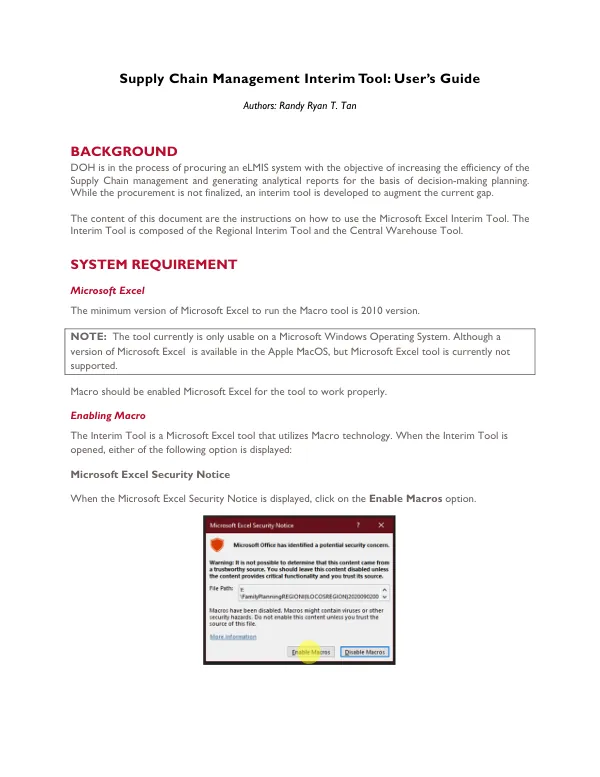
The tool is intended to increase the efficiency of Supply Chain management and generate analytical reports for decision-making planning. The procurement of an eLMIS system is ongoing, but the interim tool is available to support the current process. The Interim Tool consists of two primary components: the Regional Interim Tool and the Central Warehouse Tool. The Regional Interim Tool is a Microsoft Excel template that processes data extracted from the PMIS system, while the Central Warehouse Tool is a Microsoft Excel tool that accepts summary files from the 17 regions. To use the Interim Tool, Microsoft Excel 2010 or later is required, and the Macro feature must be enabled. When opening the tool, a Microsoft Excel Security Notice may appear, prompting the user to enable macros. Alternatively, a SECURITY WARNING notice may appear, requiring the user to click the Enable Content button to enable macros. The Regional Template is a Microsoft Excel file that processes data extracted from the PMIS system. The template is named FamilyPlanning<Regional Name><Time Stamp>.xlsm, and it is available for each of the 17 regions. When the template is opened, a startup function should automatically execute, processing the data and formatting it accordingly. If the startup function does not execute automatically, the user should close the template and ensure that macros are enabled. The Regional Template includes several key features, including Auto Allocation, which allows users to automatically set quantities to order for each facility per commodity. The Generate DR function enables users to generate delivery receipts for the region, provided that actual quantities available in the warehouse and unit prices are set and valid. The Commodities Worksheets represent data for each commodity, grouped by facility, and include columns for facility information, editable columns, reference columns, and miscellaneous data. The Central Warehouse Template is a Microsoft Excel tool that accepts summary files from the 17 regions. When the template is opened, a startup function should automatically execute, checking for summary files received from the regions. If summary files are present, they are loaded, and the loading status is updated in the Status of Reporting Worksheet. The Generate DR function enables users to generate delivery receipts for the region, provided that at least one summary file from the region is loaded and unit prices are set and valid. The Interim Tool relies on data extracted from the PMIS system, including facility information, total consumption, ratio, review period, and last stock-on-hand. The tool also uses formulas to calculate suggested quantities to order, including Suggested Quantity to Order 2, which is based on the average monthly consumption and last stock-on-hand. The tool generates multiple Microsoft Excel files, including delivery receipts and summary files, which are recommended to be saved in a separate folder.