USAID DEC
Instruction for YouTube Video Uploading
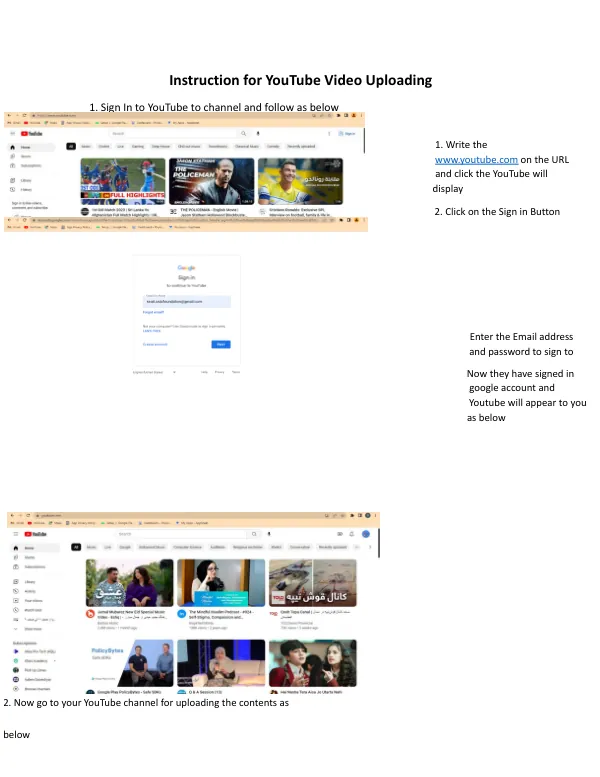
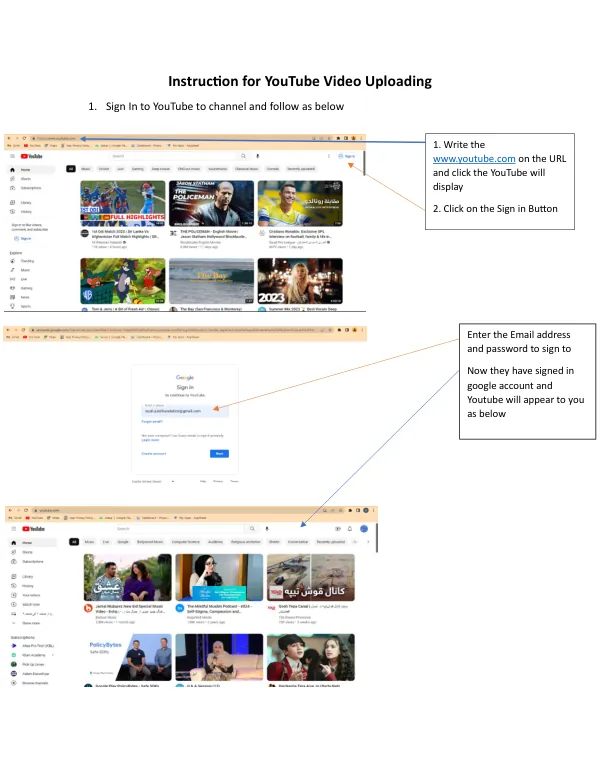
YouTube Video Uploading Process To upload a video to YouTube, users must first sign in to their channel.
5 pages
Sign in to readA free account is required to download.
Abstract
This is achieved by navigating to the YouTube website, located at www.youtube.com, and clicking the sign-in button. Upon entering their email address and password, users are logged in to their Google account, which is linked to their YouTube channel. The channel is then accessible through the user icon, where users can click on "Your Channel" to manage their content. Once logged in, users can proceed to upload a video. If the video is stored on Google Drive, users can click on the link, select the three dots, and choose "Download" to download the video before uploading it to YouTube. Alternatively, users can drag and drop or select the address of the video they wish to upload. To begin the upload process, users click on the video icon and select the video they want to upload. They then click "Open" to initiate the upload. The next step involves writing a title for the video and a description of its content. Users can also choose to add the video to a playlist, either by selecting an existing playlist or creating a new one. If a playlist does not exist, users can create one by clicking on the "Create playlist" option. When creating a playlist, users must provide a name, title, and description for the playlist, as well as choose its visibility settings. The visibility option allows users to select whether the playlist is public or private. Once the playlist is created, users can select it as the destination for their uploaded video. In addition to the title and description, users must also select the relevant tags and keywords for their video. These tags and keywords help YouTube's search algorithm identify the video's content and make it more discoverable. Users should choose a combination of relevant keywords that accurately describe the video's content. After selecting the tags and keywords, users proceed to the visibility section, where they can choose to make the video public or private. Finally, users click the "Publish" button to upload the video to their YouTube channel. The video is now live and accessible to the public, subject to YouTube's community guidelines and terms of service.